HWall 1.0.5 Brings HWiNFO-Style Hardware Sensor Monitoring to Linux
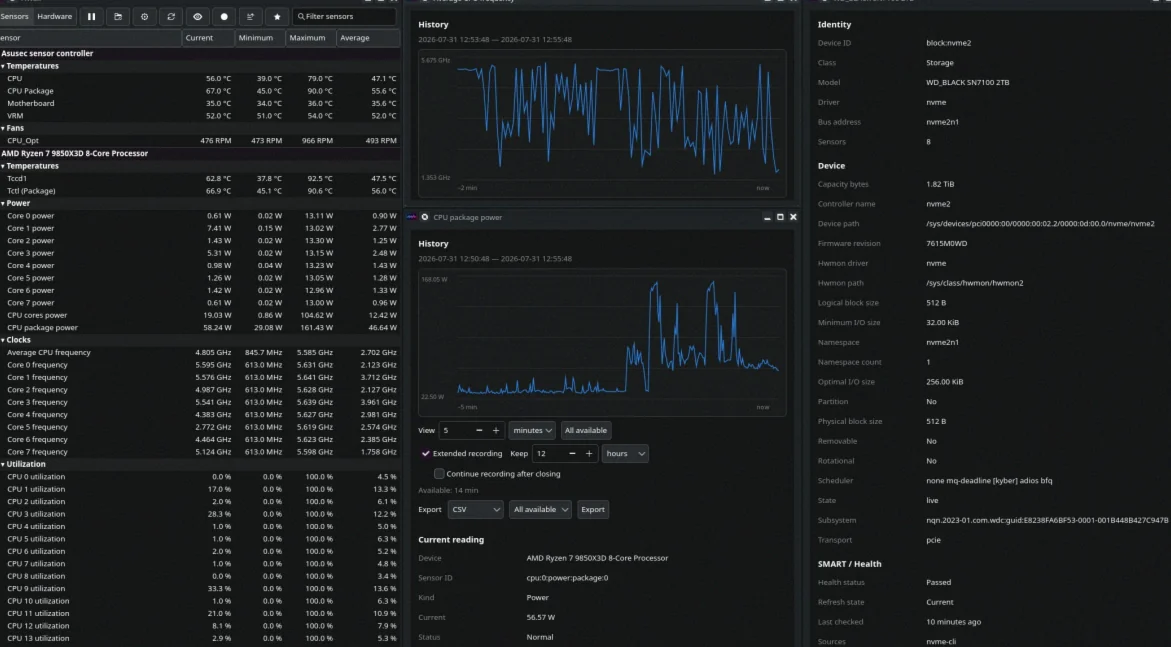
A new Linux hardware-monitoring project, HWall, has landed in version 1.0.5: a Rust-based tool that mirrors the “sensor dashboard” style popularized by HWiNFO, pulling live telemetry from Linux kernel interfaces and presenting it in a hierarchical table view.
HWall brings an HWiNFO-style sensor view to Linux
Developer pulpul-s released HWall on GitHub as a workspace made up of four Rust crates. The project includes both a GTK 4 application and a separate command-line utility.
For Linux users who currently bounce between tools like lm-sensors, Psensor, and terminal workflows, HWall aims to consolidate monitoring into one place: it provides a structured overview and live telemetry in a way that resembles what Windows users expect from HWiNFO.
- Latest release: 1.0.5 (published “a few days ago”)
- Version metadata spotted in repository: Cargo.toml lists 1.0.4
- Setup packages: no ready-made binaries or distro packages available
How it works: kernel hwmon data, plus optional helpers
HWall’s measurements come exclusively from interfaces the Linux kernel already provides, particularly the hwmon subsystem under /sys/class/hwmon. The app does not load kernel modules, does not require administrator privileges during normal operation, and does not write to system configuration.
What appears in the UI depends on the loaded driver. For example, the nct6775 module is referenced for Nuvoton Super I/O chips, and asus-ec-sensors for supported Asus motherboards. On more unusual hardware, the tool may fall back to CPU core temperatures as the most reliable readings.
Charts, alerts, exports, and effective CPU frequency
Each sensor in HWall shows current, minimum, maximum, and average values, plus how many readings were collected. Sensor history is kept in memory, with charting that supports zoom and time stamps. The default history window is one minute, with a maximum view up to 24 hours.
For data handling, the project can export sensor history as CSV or JSON Lines. Alerting is built per sensor, using minimum trigger durations, hysteresis, and cool-down timing to prevent short load spikes from spamming notifications.
One particularly useful feature for CPU monitoring on supported x86 processors: HWall computes the effective clock per logical core using APERF and MPERF, reporting the actual frequency rather than only the requested value.
Alongside the GUI, the command-line tool supports a JSON endpoint: running hwall-cli serve returns the latest snapshot over HTTP by default on 127.0.0.1:8765.
Why some readings may be blank (drivers, rights, and external tools)
HWall’s display can be incomplete unless supporting utilities are present:
- lm-sensors for hwmon naming and scaling
- smartmontools and nvme-cli for SATA and NVMe drive health data
- nvidia-smi for full telemetry on Nvidia GeForce GPUs
- dmidecode for motherboard, firmware, TPM, and memory module information (requires elevated rights)
Energy counters are also a special case. On many systems, performance counters are restricted for non-root users, so HWall checks each energy domain individually and omits domains it cannot access.
To see processor package power/energy data, users may need to lower perf_event_paranoid, which enables system-wide performance monitoring. The developer also warns against running multiple monitoring programs in parallel, because some drivers may communicate with firmware or an embedded controller during sensor reads.
Installation status: compile from source, and a license issue blocks packaging
As of the current repository state, HWall has no distributable binaries or signed packages. Users must compile it themselves.
Requirements listed include Rust 1.92, GTK 4.8 development files, pkg-config, and a standard C toolchain. Building via make release produces both hwall and hwall-cli
GTK is the main hurdle: if you only want the CLI, make release-cli builds just the command-line program. The developer notes that on Arch-based systems like CachyOS, dependencies can be installed in a single step.
However, package maintainers may be blocked by licensing. A repository check on 11 August 2026 shows an early-stage project (48 commits, four stars) with no entry in the Releases area. Crucially, the project appears to omit a license declaration entirely—no license file in the repo and no license field in Cargo.toml. The developer states the code is visible but not explicitly released as free software.
Until the licensing question is resolved, the project is unlikely to be accepted into distribution package repositories for Arch, Fedora, and Debian.
What to watch next
HWall is already functional enough to interest Linux hardware enthusiasts—especially players who want Windows-like visibility into temps, clocks, and drive telemetry. The biggest near-term variables are (1) whether additional helpers and drivers improve coverage on more hardware, and (2) whether the author adds a clear license so distribution maintainers can package it.
For now, the practical takeaway is straightforward: HWall can provide an HWiNFO-like overview on Linux, but exact completeness will depend on kernel driver support, installed companion utilities, and access permissions—especially for GPU telemetry and energy readings.